POST /path HTTP/1.1
Content-Type: text/plain
Content-Length: 5
hello
POST /path HTTP/1.1\r\nContent-Type: text/plain\r\nContent-Length: 5\r\n\r\nhello
POST /path HTTP/1.1
Content-Type: text/plain
Content-Length: 5
hello
\r\n\r\nPOST /path HTTP/1.1
Content-Type: text/plain
Content-Length: 5
hello
POST /path HTTP/1.1
Content-Type: text/plain
Content-Length: 5
hello
Protocol://host:port/path?query_string#fragment
https://duckduckgo.com/?q=web+development&ia=images
?=&% followed by 2 hex values한 is encoded as %ed%95%9c <-- single space is encoded as %20%20+
+ indicates a key mapping to multiple values? begins a query string-._~| Reserved | Characters |
|---|---|
: |
# |
& |
* |
/ |
+ |
' |
@ |
? |
, |
( |
) |
[ |
] |
! |
; |
$ |
= |
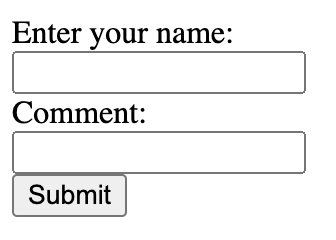
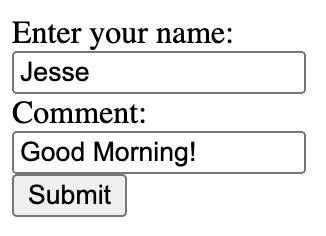
GET /form-path?commenter=Jesse&comment=Good+Morning%21 HTTP/1.1
POST /form-path HTTP/1.1
Content-Length: 27
Content-Type: application/x-www-form-urlencoded
commenter=Jesse&comment=Good+morning%21
Do you trust literally everyone??
&, <, and > with their HTML escaped characters& -> &< -> <> -> >& < > will be rendered as characters by the browser&, <, and > with their HTML escaped charactersbecomes
and is rendered as a string instead of interpreted as HTML
&, <, and > with their HTML escaped characters& is escaped last you'll get:Asynchronous JavaScript [And XML]
A way to make HTTP requests using JavaScript after the page loads
var request = new XMLHttpRequest();
request.onreadystatechange = function(){
if (this.readyState === 4 && this.status === 200){
console.log(this.response);
}
};
request.open("GET", "/path");
request.send();XMLHttpRequest objectopen to set the request type and pathsend to make the requestvar request = new XMLHttpRequest();
request.onreadystatechange = function(){
if (this.readyState === 4 && this.status === 200){
console.log(this.response);
}
};
request.open("GET", "/path");
request.send();var request = new XMLHttpRequest();
request.onreadystatechange = function(){
if (this.readyState === 4 && this.status === 200){
console.log(this.response);
}
};
request.open("POST", "/path");
let data = {'username': "Jesse", 'message': "Welcome"}
request.send(JSON.stringify(data));return false to block the page reloadevent.preventDefault(); in the JS functiongetMessages() (Implementation not shown) every second
getMessages() will make the AJAX call to get the most recent data from the server and render it on the page