WebRTC Details

WebRTC

WebRTC - Overview

  • Web Real Time Communication
  • Establishes a live streaming peer-to-peer connection
    • We'll stream video and audio to make a video chat app
  • Stable release in 2018
  • Widely adopted by major browsers
    • Most of the WebRTC logic/code is built into your browser

WebRTC - Overview

  • WebRTC establishes a live streaming peer-to-peer connection
  • Peer-to-peer
    • Two clients will communicate without the use of a server
    • Your server will only help the clients establish the connection
    • The server does not handle the steaming data
  • Live streaming
    • The protocol is meant for live (real-time) streaming
    • End-to-end delay is critical!
    • Even a small delay will result in clients talking over each other on a voice/video call

WebRTC - Overview

  • TCP can be slow!
    • Meant for reliability
    • If a packet is dropped, request a resend and wait
    • Only deliver bytes after all packets arrive and are reassembled
    • Not suitable for live [real-time] streaming*

Other protocols are used when delays are tolerable (ie. not real-time) like YouTube Live or Twitch

WebRTC - Overview

  • WebRTC uses UDP instead of TCP
  • UDP (User Datagram Protocol)
    • Meant for speed
    • If a packet is dropped, it's lost forever. Move on with your life
    • Bytes are delivered as soon as they are received
    • Very close to using raw IP packets

WebRTC - Overview

  • Servers are still involved
    • We'll discuss 3 types of servers that assist in WebRTC connections
  • Signalling Server
    • Passes messages between clients to help them establish a peer-to-peer connection
    • Once the connection is established, the server's job is done (Unless you want to pass a disconnect message)
  • STUN (Session Traversal Utilities for NAT) Server
    • A server that tells clients their public IP/port
  • TURN (Traversal Using Relays around NAT) Server
    • Optional for WebRTC connections [Most of the time]
    • All WebRTC packets for a connection are routed through the TURN server if one is used

WebRTC

  • Need to establish a real-time streaming peer-to-peer connection
  • But how?
    • Need the IP address of your peer
    • Need to agree on the details of the connection

Two peers with a dashed two-way arrow between them: they want a direct peer-to-peer connection.

WebRTC - Connecting

  • One peer needs to get an offer to the other peer
  • This is an offer to establish a connection that contains:
    • audio/visual codec, bitrate, etc details (How to interpret the bytes once the streaming starts)
    • A username fragment ("ice-ufrag") as a unique identifier

Peer 1 sends a webRTC-offer to peer 2.

WebRTC - Connecting

  • The peer responds with an answer
  • The answer contains their audio/visual data
  • Contains their own ufrag so the connection can be identified
  • Once the answer is received, the peers agree to connect

Peer 1 sends a webRTC-offer to peer 2, and peer 2 replies with a webRTC-answer.

WebRTC - Connecting

  • But there's a problem
  • How do we send these messages between two peers?

Peer 1 sends a webRTC-offer to peer 2, and peer 2 replies with a webRTC-answer. A large question mark sits between them: how do these messages reach the other peer?

WebRTC - Connecting

  • For usual web traffic with a server:
    • Type in a domain name or click a link containing a domain name
    • Use DNS to lookup the [static] IP address of the server
    • Send a request to the IP address on port 80 or 443

Peer 1 sends a webRTC-offer to peer 2, and peer 2 replies with a webRTC-answer. A large question mark sits between them: how do these messages reach the other peer?

WebRTC - Connecting

  • For peer-to-peer traffic:
    • We need to discover the IP and port of the peer without DNS
    • Peer IP/port can change (dynamic IP)

Peer 1 sends a webRTC-offer to peer 2, and peer 2 replies with a webRTC-answer. A large question mark sits between them: how do these messages reach the other peer?

WebRTC - Signalling Server

  • Offer and answer are sent through a signaling server
    • On the HW - You are the signaling server!!
  • Both peers connect to your server
  • Send offer/answer to the server and the server forwards the messages to the other peer

Peer 1 sends a webRTC-offer to the signalling server, which forwards it to peer 2. Peer 2 sends a webRTC-answer to the signalling server, which forwards it to peer 1.

WebRTC - Signalling Server

  • We need a method to send these messages
  • We'll need a way for the server to be able to send messages to each client in real-time

Peer 1 sends a webRTC-offer to the signalling server, which forwards it to peer 2. Peer 2 sends a webRTC-answer to the signalling server, which forwards it to peer 1.

WebRTC - Signalling Server

  • We need a method to send these messages
  • We'll need a way for the server to be able to send messages to each client in real-time
  • Wow! It's really convenient that we have WebSockets!

Peer 1 sends a webRTC-offer to the signalling server, which forwards it to peer 2. Peer 2 sends a webRTC-answer to the signalling server, which forwards it to peer 1.

WebRTC - Signalling Server

  • When your server receives a WebSocket frame containing an offer or answer
    • Send the payload to the other peer over their WebSocket

Peer 1 sends a webRTC-offer to the signalling server, which forwards it to peer 2. Peer 2 sends a webRTC-answer to the signalling server, which forwards it to peer 1.

WebRTC - NATs

  • We have another issue..
  • How do we know the IP address and port for each peer?

Peer 1 has local address 192.168.0.5 port 8956 behind a NAT, which talks to the signalling server from public address 159.89.179.140 port 10678. Peer 2 has local address 192.168.0.52 port 14568 behind a NAT, which talks to the signalling server from public address 23.34.59.30 port 5670.

WebRTC - NATs

  • Devices are commonly "hidden" behind NAT routers
    • Network Address Translation
  • With a NAT:
    • You have a local IP address for communication on your local network
    • When communicating outside your network, the NAT router sends your message using a public IP address and port number

Peer 1 has local address 192.168.0.5 port 8956 behind a NAT, which talks to the signalling server from public address 159.89.179.140 port 10678. Peer 2 has local address 192.168.0.52 port 14568 behind a NAT, which talks to the signalling server from public address 23.34.59.30 port 5670.

WebRTC - NATs

  • With a NAT:
    • Many devices on a local network can share a single public IP address
    • Each device does not know it's public IP/port used when it communicates to the outside world
    • [Also the problem that port-forwarding solves]

Peer 1 has local address 192.168.0.5 port 8956 behind a NAT, which talks to the signalling server from public address 159.89.179.140 port 10678. Peer 2 has local address 192.168.0.52 port 14568 behind a NAT, which talks to the signalling server from public address 23.34.59.30 port 5670.

WebRTC - STUN Server

  • Solution: Use a STUN (Session Traversal Utilities for NAT) Server
  • Each peer connects to a STUN server and asks for their public IP/port
  • STUN server checks the origin IP/port and informs the client
  • We'll use Google's free STUN server (stun.l.google.com:19302)
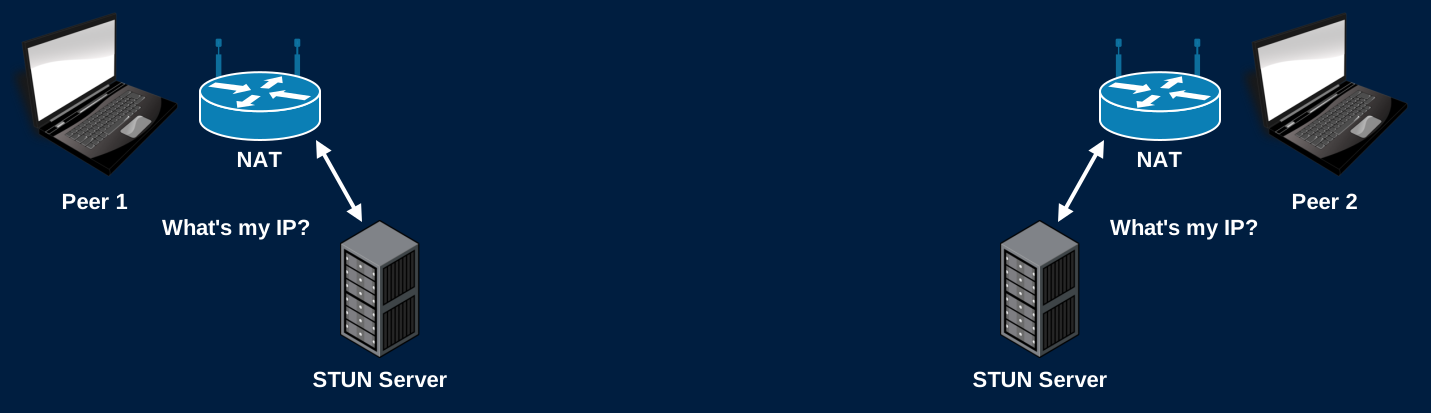
Each peer, behind its NAT, asks a STUN server: What's my IP?

WebRTC - ICE Candidate

  • Each peer sends their public IP/port, and connection information, in an ICE (Interactive Connectivity Establishment) candidate message
  • Whenever your signaling server receives an ICE candidate, forward it to the other peer
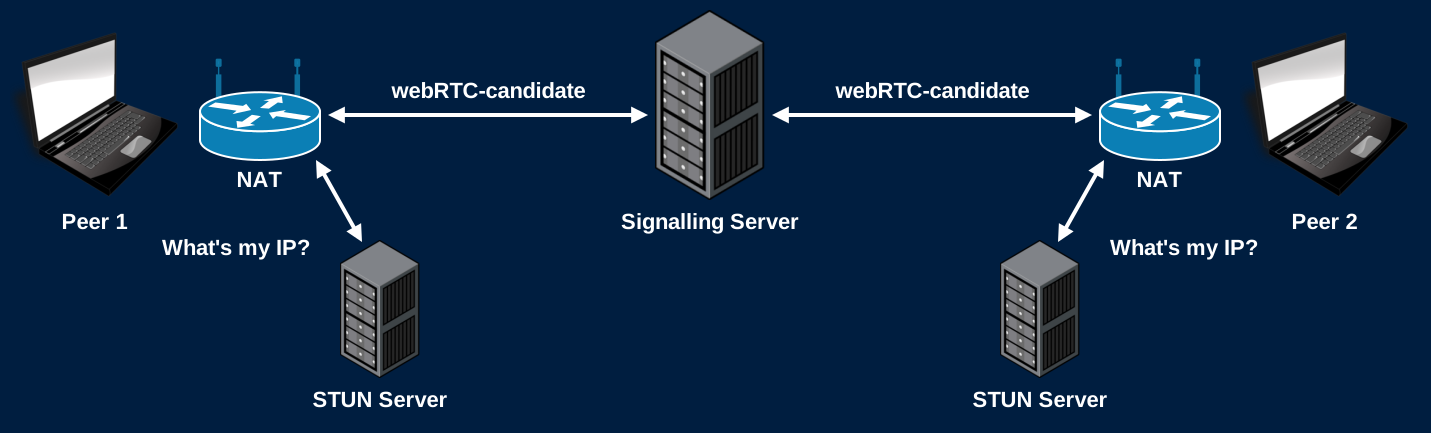
Each peer asks its STUN server: What's my IP? Then each peer sends a webRTC-candidate through the signalling server to the other peer.

WebRTC - ICE Candidate

  • Candidate contains:
    • Connection type - UDP, not TCP
    • IP/port - Local in this example
    • Username fragment - Uniquely identifies the connection

Each peer asks its STUN server: What's my IP? Then each peer sends a webRTC-candidate through the signalling server to the other peer.

WebRTC - ICE Candidate

{"candidate":"candidate:2382557538 1 udp 2122260223 192.168.1.19 54090 typ host generation 0 ufrag FGP/
 network-id 1 network-cost 10","sdpMid":"0","sdpMLineIndex":0}

Each peer asks its STUN server: What's my IP? Then each peer sends a webRTC-candidate through the signalling server to the other peer.

WebRTC - Connection

  • And now we can establish a peer-to-peer connection!
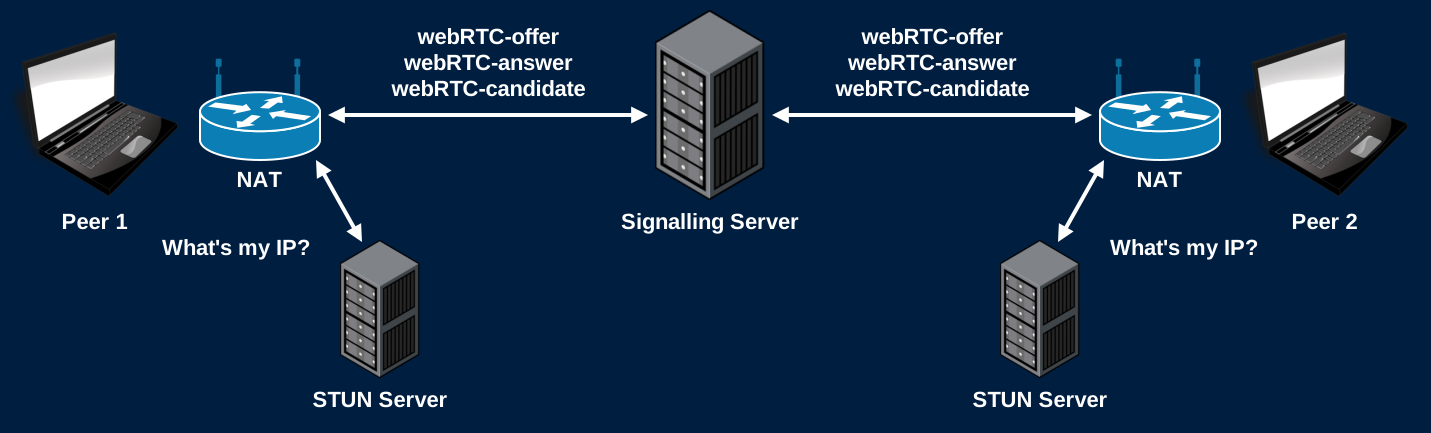
Each peer asks its STUN server: What's my IP? The webRTC-offer, webRTC-answer, and webRTC-candidate messages travel between the peers through the signalling server.

WebRTC - Summary

  • One peer sends an offer to the other
  • Other peer responds with an answer
  • Both peers get their public IP/port from their STUN Servers
  • Both peers send their ICE candidates to the other

Each peer asks its STUN server: What's my IP? The webRTC-offer, webRTC-answer, and webRTC-candidate messages travel between the peers through the signalling server.

WebRTC - Summary

  • Once the connection is established
  • The servers step aside and the clients stream directly to each other
    • True peer-to-peer!

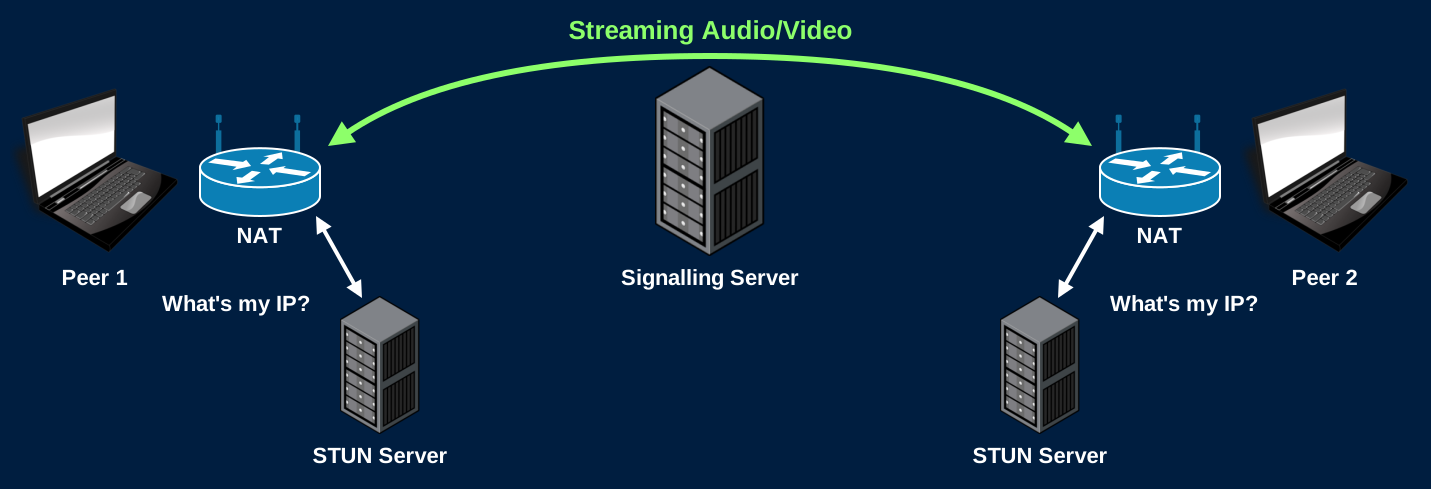
The peers stream audio and video directly to each other. The signalling server and STUN servers are no longer involved.

WebRTC - Summary

  • Your role in all of this?
    • Route the offer/answer/candidate messages between peers
  • No need to read/parse/interpret the RTC portion of these messages
    • Extract the payload from the WS frame, send it to the appropriate peer as a new WS frame

Each peer asks its STUN server: What's my IP? The webRTC-offer, webRTC-answer, and webRTC-candidate messages travel between the peers through the signalling server.

WebRTC - Restrictions

  • The browser will not allow WebRTC connections when connected to a site using HTTP (as opposed to HTTPS)
  • Must have an encrypted connection to use WebRTC
    • *Unless connecting over localhost (Let's us test locally)

Each peer asks its STUN server: What's my IP? The webRTC-offer, webRTC-answer, and webRTC-candidate messages travel between the peers through the signalling server.

WebRTC - Restrictions

  • Sometimes a peer-to-peer connection cannot even be established
    • Can have restrictive firewalls
    • Dynamic NATs might change your port unexpectedly
    • Organizations might block certain traffic on their network

Each peer is behind a NAT and a firewall. There is no connection between them.

WebRTC - TURN Server

  • In cases where peer-to-peer is blocked:
    • Use a TURN (Traversals Using Relays around NAT) Server
    • After the connection is established using a signaling server, each peer routes their streaming data through a TURN server

Each peer is behind a NAT and a firewall. Both peers stream audio and video to a TURN server, which relays it to the other peer.

WebRTC - TURN Server

  • If you ask me... using a TURN server defeats the purpose of using a peer-to-peer technology
  • ... Unless you run your own TURN server!

Each peer is behind a NAT and a firewall. Both peers stream audio and video to a TURN server, which relays it to the other peer.

Further Reading