Reverse Proxy Servers - Nginx
HTTPS with Nginx
The Problem
- We want to use HTTPS
- Encrypts all web traffic
- Prefer not to modify your app code
- Makes our code more modular and portable
- Your HTTPS setup can change without changing your app
- Use a reverse proxy
Nginx
- Nginx has many uses and is very powerful software
- We'll use it as a reverse proxy with TLS to enable HTTPS
- One nginx can sit in front of many servers
- On the project: route /register, /login, and /logout to your auth service, and everything else to your app
Nginx Strategy
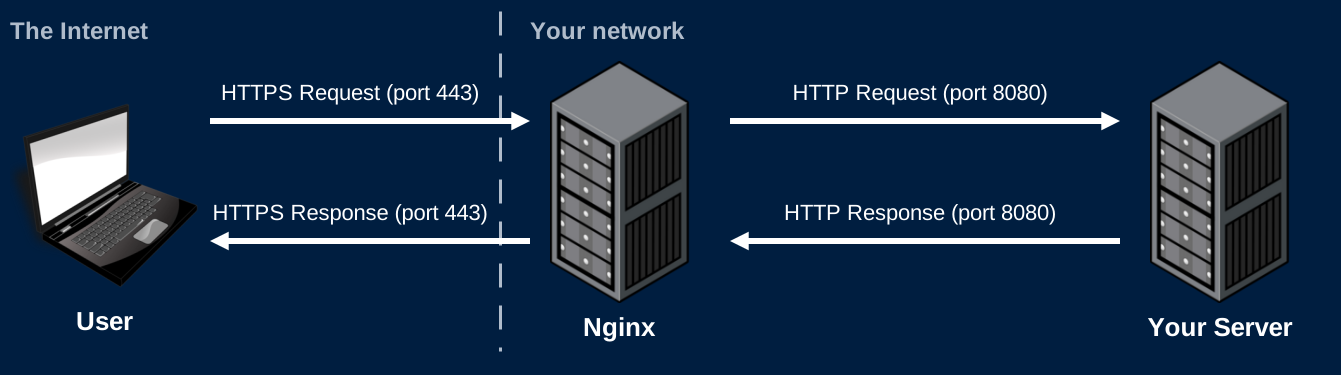
- Use Nginx to listen for HTTPS requests
- Nginx needs a cert and private key
- Nginx will decrypt requests and forward them to your server as HTTP requests
- These unencrypted requests are sent over a local network and never touch the Internet
- Your server sends HTTP responses to Nginx
- Nginx encrypts and sends the HTTPS response over the Internet
- If Nginx gets an HTTP request (port 80) redirect the user to HTTPS (port 443)
Nginx Strategy
Certificates
OpenSSL
- OpenSSL is a very common SSL/TLS library
- Written in C
- Wrappers exist for many languages
- Can be used for many encryption needs
- Generating keys
- Signing certs
- Validating certs
- We'll use OpenSSL in the command line to generate self-signed certificates
Self-Signed Certificate
openssl req -x509 -newkey rsa:4096 -keyout private.key -out cert.pem -days 365 -sha256 -nodes -subj "/C=US"- This command will generate a self-signed certificate and a private key
- Private key saved as private.key
- Certificate saved as cert.pem
- The browser warns every user: no certificate authority vouched for it
- Fine for testing. Not for a deployed app
Let's Encrypt
- A certificate authority that issues free certificates
- Trusted by every major browser
- Before issuing a certificate, it checks that you control the domain
- It asks for a file at
http://yourgame.me/.well-known/acme-challenge/<token> - Only the server your domain points to can serve that file
- It asks for a file at
- Certbot automates all of this
Certbot
- On your server, with your domain already pointing to it:
--standalone: Certbot answers the challenge itself on port 80- Nothing else can be using port 80 while it runs. Stop nginx first
- Saves your certificate and private key:
/etc/letsencrypt/live/yourgame.me/fullchain.pem/etc/letsencrypt/live/yourgame.me/privkey.pem
- Certificates expire after 90 days.
sudo certbot renewgets a new one
Domain Names
- Register a domain name
- The GitHub Student Developer Pack includes free domains for 1 year
- Add an A record that maps your domain to your server's public IP
yourgame.me→3.89.120.15
- DNS changes can take minutes to hours to reach everyone
- Check with
dig yourgame.meornslookup yourgame.me
- Check with
- Get your DNS working before running Certbot
Nginx Configuration
Redirect HTTP to HTTPS
- Any request on port 80 gets a 301 to the same path over HTTPS
$hostand$request_uriare filled in by nginx for each request
Terminate TLS and Proxy
server {
    listen 443 ssl;
    server_name yourgame.me;
    ssl_certificate     /etc/letsencrypt/live/yourgame.me/fullchain.pem;
    ssl_certificate_key /etc/letsencrypt/live/yourgame.me/privkey.pem;

    location / {
        proxy_pass http://app:8080;
        proxy_set_header Host $host;
        proxy_set_header X-Forwarded-For $proxy_add_x_forwarded_for;
        proxy_set_header X-Forwarded-Proto $scheme;
    }
}appis the name of your app's service in docker compose
WebSockets Through Nginx
location /websocket {
    proxy_pass http://app:8080;
    proxy_http_version 1.1;
    proxy_set_header Upgrade $http_upgrade;
    proxy_set_header Connection "upgrade";
    proxy_read_timeout 3600s;
}- Upgrade and Connection apply to one hop only. Nginx drops them unless you set them again
- Nginx closes a proxied connection after 60 seconds without data
- Raise the timeout, or keep the connection busy with heartbeats
WSS in the Front End
- A page loaded over HTTPS can't open a
ws://connection- The browser blocks it as mixed content
- Pick the protocol from the page's own protocol:
const protocol = location.protocol === "https:" ? "wss://" : "ws://";
const socket = new WebSocket(protocol + location.host + "/websocket");- The same code works at
http://localhost:8080and on your deployed domain
The Client's Real IP
- Behind nginx, every request arrives from nginx's container
- Your logs show the same IP for everyone
- IP-based limits would block everyone at once
- Nginx adds the client's address to
X-Forwarded-For - Only trust this header from your own proxy. Clients can send it too
- Flask:
app.wsgi_app = ProxyFix(app.wsgi_app, x_for=1), thenrequest.remote_addr - Express:
app.set("trust proxy", 1), thenreq.ip - Most frameworks have a similar "trusted proxy" setting
- Flask:
Deploying
Docker Compose on a Server
services:
  nginx:
    image: nginx
    ports:
      - "80:80"
      - "443:443"
    volumes:
      - ./nginx.conf:/etc/nginx/conf.d/default.conf:ro
      - /etc/letsencrypt:/etc/letsencrypt:ro
  app:
    build: .
  mongo:
image: mongo- Only nginx publishes ports. Your app and database are reachable by name inside the compose network
- Never publish your database's port on a public server
Local and Deployed
- Locally there's no domain and no certificate
- Nginx listens on port 8080 with plain HTTP
- On the server, nginx listens on 80 and 443 with your certificate
- Keep both:
- A separate nginx config for each, chosen by a compose override file
docker compose -f compose.yml -f compose.prod.yml up -don the server
- Never commit your certificate's private key
Secure Cookies
- Add the
Securedirective to your auth cookies- The browser only sends them over HTTPS
- Browsers treat
http://localhostas secure- Secure cookies still work when testing locally
Nginx Strategy
Demo