JSON Web Tokens (JWTs)
Self-contained auth tokens: How JWTs are built, signed, and verified, and how a separate auth service issues them
JSON Web Tokens (JWTs)
Why JWT?
- We'll use JWTs for persistent authentication
- We currently use authentication tokens to solve the same problem
- Why do we need a new mechanism?
- What's wrong with auth tokens??
Recall Auth Tokens
- Server issues an auth token on login
- Store token in database on login
- Lookup token in database for authentication
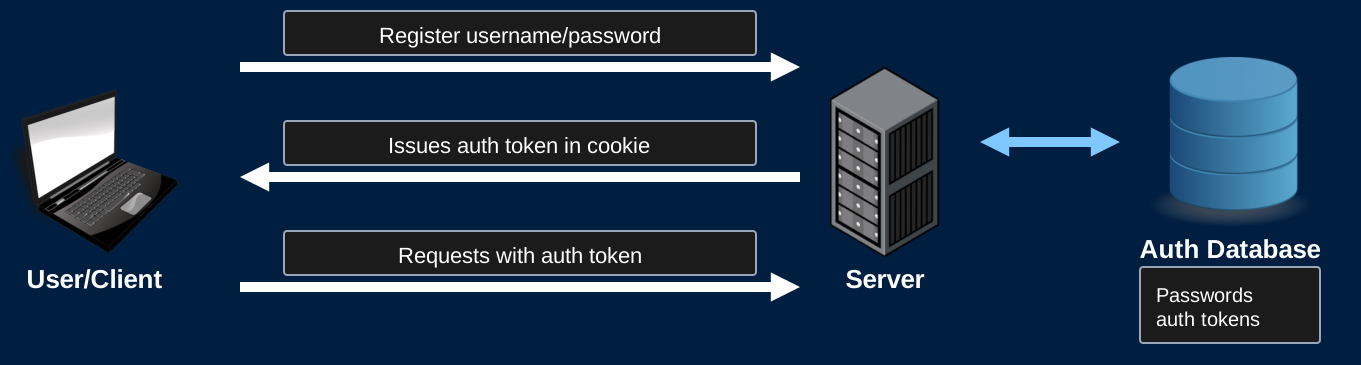
Recall Auth Tokens
- The token is opaque
- Random meaningless bytes
- Database lookup is required
Recall Auth Tokens
- When your app gets HUGE
- Make it distributed!
- Separate parts of your app onto different servers
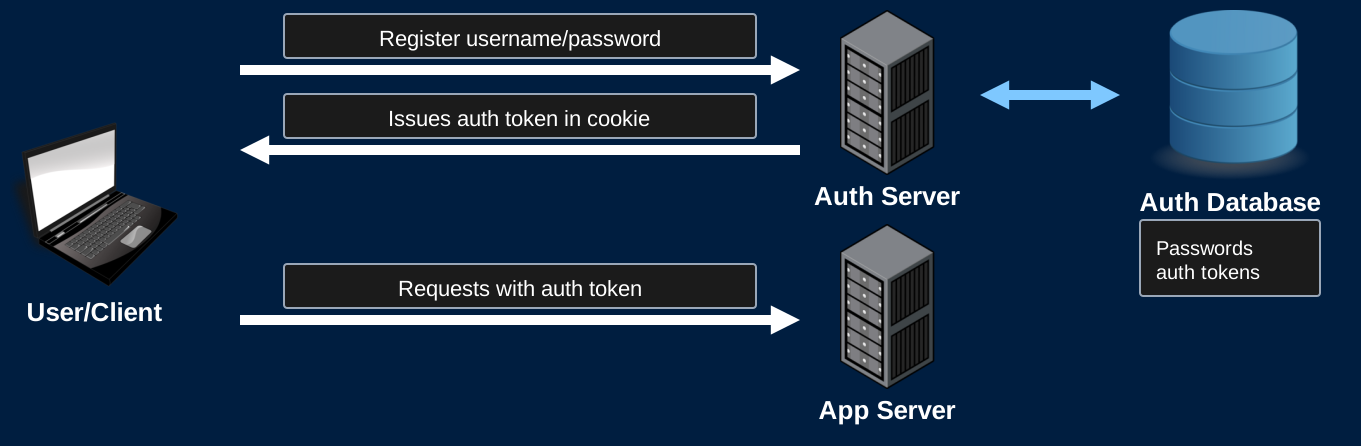
Recall Auth Tokens
- App server needs to verify the auth token
Auth Tokens - Distributed
- App server needs to verify the auth token
- Option 1: Shared DB
- App server connects to the same DB as the auth server to lookup the auth token
- Advantage: Code is simple. Same thing we've been doing
- Disadvantage: Slow and complex architecture
- DB must support multiple servers
- App must connect to the shared DB on every authenticated request
Auth Tokens - Distributed
- App server needs to verify the auth token
- Option 2: Server-Server Communication
- App server sends a request to the auth server to verify the token
- Advantage: Avoids a shared DB
- Disadvantage: Slow
- Every authenticated requests requires the app server, auth server, and the auth DB
- Might as well have a monolith app (It's effectively not distributed)
Introducing JWTs
- Instead of auth token
- Issue a self-contained JWT
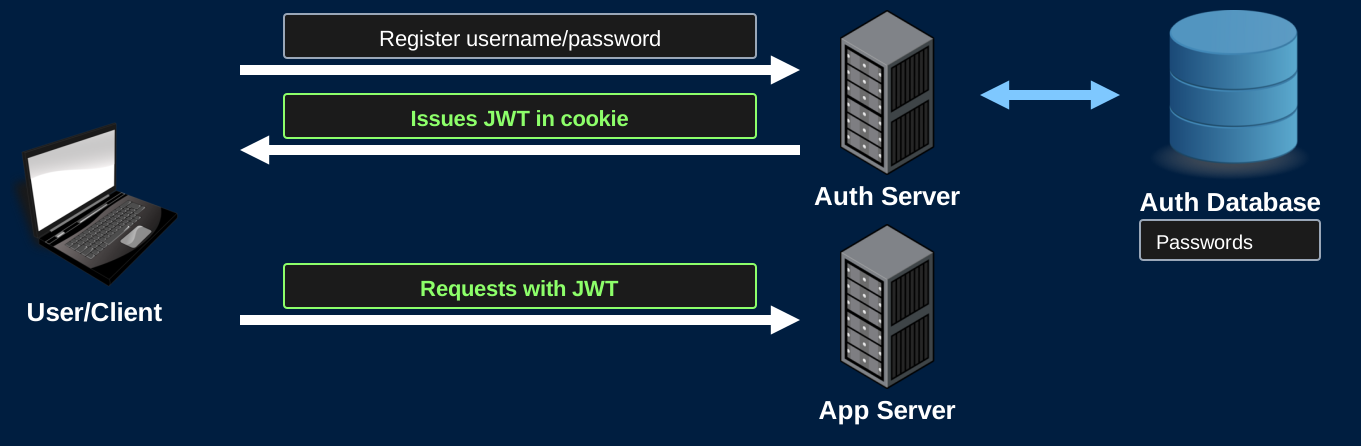
JWT
- JWTs are tokens that are designed to be self-contained
- Contain all information needed for authentication/authorization
- No need to talk to the DB or the auth server
- Auth server doesn't even need to store JWTs
- App server receives a request containing a JWT
- Verify the token locally
JWT
- JSON Web Tokens
- Often pronounced "jot"
- JSON
- Contains a payload that must be a JSON object
- Web
- Encoded using url-safe characters
- Can be used in HTTP headers
- Tokens
- Typically used for authentication/authorization
- Can be used to solve any problem that wants tokens
JWT - Structure
- A JWT is composed of three parts
- Headers
- Specifies the type of token, and algorithm used for signing
- Claims
- The payload of the token
- Can contain the identity of the user (Authentication) and any scopes they can access (Authorization)
- Signature
- The signature of the token using the algorithm specified in the headers
JWT - Structure
- Each of the three parts are Base64URL encoded
- Base64
- Maps 3 bytes of arbitrary data into 4 ASCII characters
- 64 characters: a-z, A-Z, 0-9, '+', '/'
- If length%3 != 0, pad with '='
- Not suitable for the web
- Base64URL
- Replace '+' and '/' with '-' and '_'
- Omit the padding
- This avoids all url reserved characters
JWT - Structure
- Three Base64URL-encoded parts are separated by '.'
- eyJhbGciOiJSUzI1NiIsInR5cCI6IkpXVCJ9.eyJ1c2VybmFtZSI6IkFsaWNlIn0.Bh0...
- This token looks opaque
- It is not!!
- Base64URL is not a hashing algorithm!
- Base64URL is not encryption!
- Your JWTs are effectively plain-text
- This token has the claim: {"username": "Alice"}
JWT - Usage
- JWTs are effectively plain text
- Everyone with access to the token can see the claims
- Anyone can generate their own tokens with any claims they choose
- Trivial to impersonate other users
- Need to verify that the auth server issued the token
- Sign it!
JWT - Verification
- The issuer (Auth server) will cryptographically sign the JWTs it issues
- Apps will verify this signature
- Attackers cannot forge the signatures
- Example of a signed JWT:
eyJhbGciOiJSUzI1NiIsInR5cCI6IkpXVCJ9.eyJ1c2VybmFtZSI6IkFsaWNlIn0.Bh0qjhE-gYMC3uQOORQ7yrsjUeESQ6fBqrt5dpGXRQ5i4z9FCsN1USZVw10MFZf9XPq5mt9MLyMNSrMsvVnCFYcWONbmupgWxMi4MMkziy9LePgFosFX-SSb64mWZsE6t8MG657ZmvkmRpq7AINtOi4UZpFmpTcvNFrVRXIi8os9i6PcPbplBAyPq4a8sIxQXcLqyObr84CZQv3q67NFI-ZP0RQHu9qm65CxdchHVW7kuwTWyTvvZWNMS3Ga_9VY2QdYr8oyMAYDySCwtaL5eTk8Zm8TNiBHLCD15H8A7IQ7_r2V7cXxeXBgDXfs1DqufcEv6lSsBN1i3rat096bxlPM183zTRKD-WYHLzIJV1FTRCms4lmwYlPfDski-nX41sWIvUk2FNtuWl1QcQmR8WVxFhXtmicka4caU83iL_zlTGVTswuW5Bd6UBsJ1c9c_OBE28RnMtR23duJZsL7lTqCIn9H_7GvLrwWy1JgAp4CRqeiFR8j8vJne1XcIJJ9hJVWL-2bdbe6Iu_SAWUpmiAeXy3NfJaTibSSCANs2ple_eCY7mg1ebrGHIdNq9W3izjHwyNFAg8p5K3aNnv8rLe6yJhXg0CS94s3oLkhiEa83y4pvnjO2Adgm9o4Z3uE0Hb1nZN_LJuOWMZbdPZavmPKlTFsSzUZ_hE0AdWtabc
JWT - Verification
- Public/Private key
- In CSE312, we'll prefer to sign tokens with a private RSA key using the RS256 algorithm
- This algorithm computes a SHA256 hash of the encoded headers and claims of the token
- Sign this hash using the auth server's private key
- The Base64URL encoding of this signature is the 3rd part of the token
- App server has the auth servers public key
- Use the public key to verify the signature
JWT - Verification
- Public/Private key
- Attackers can generate JWTs with valid headers and claims
- Attackers cannot forge the signature
- If the signature is not valid, do not accept the token
JWT - Verification
- Shared Secret
- Alternatively, all servers can control a shared secret used to both sign and verify signatures
- If the secret is not compromised, this is just as good as private key signatures
- Downside:
- Expands your attack surface
- Attacker who compromises any server has your shared secret
- Not wise if you're issuing tokens that are verified by 3rd party servers
- Expands your attack surface
- Not allowed on the project. Only your auth service may have the signing key
Registered Claims
- RFC 7519 defines some standard claims. All are optional
exp: Expiration time, in seconds since 1970. Reject the token after this timeiat: When the token was issuedsub: Who the token is about (eg. the user's id)iss: Who issued the token (eg. your auth service)
- Always set
exp- A JWT can't be revoked. Expiring is how it stops working
Verifying a JWT
- Use a library
- Check the signature with the auth service's public key
- Check
exp - Choose the algorithm yourself. Never use the one in the token's header
- An attacker can set
"alg": "none", or switch RS256 to HS256 and sign with your public key
- An attacker can set
Storing JWTs
- Store the JWT in a cookie, the same way as an auth token
- HttpOnly: JavaScript can't read it, so an XSS attack can't steal it
- Secure: Only sent over HTTPS
- Avoid localStorage
- Any script running on your page can read it
Logging Out
- The auth service doesn't store JWTs, so it can't delete one
- Logging out deletes the cookie from the browser
- A copy of the token still works until it expires
- Options:
- Short-lived tokens, plus refresh tokens to get new ones (Recall OAuth)
- Any other option requires communication with the auth server or database (This is what we're trying to avoid)
Compromised JWTs
- A compromised JWT is valid until it expires
- Just like logging out, the auth server has no way to revoke a JWT once it's issued
- Using short expiration times limits the damage that can be done (Typically ~1 hour)
JWT - Encryption
- JWTs can optionally be encrypted to obfuscate the headers and claims
- Anything can be encrypted. Sometimes, people will encrypt JWTs
Recall OAuth
- When the auth and resource servers are separate
- Common for access tokens to be JWTs
- Make them short-lived and issue refresh tokens

JWTs in the Project
The Auth Service
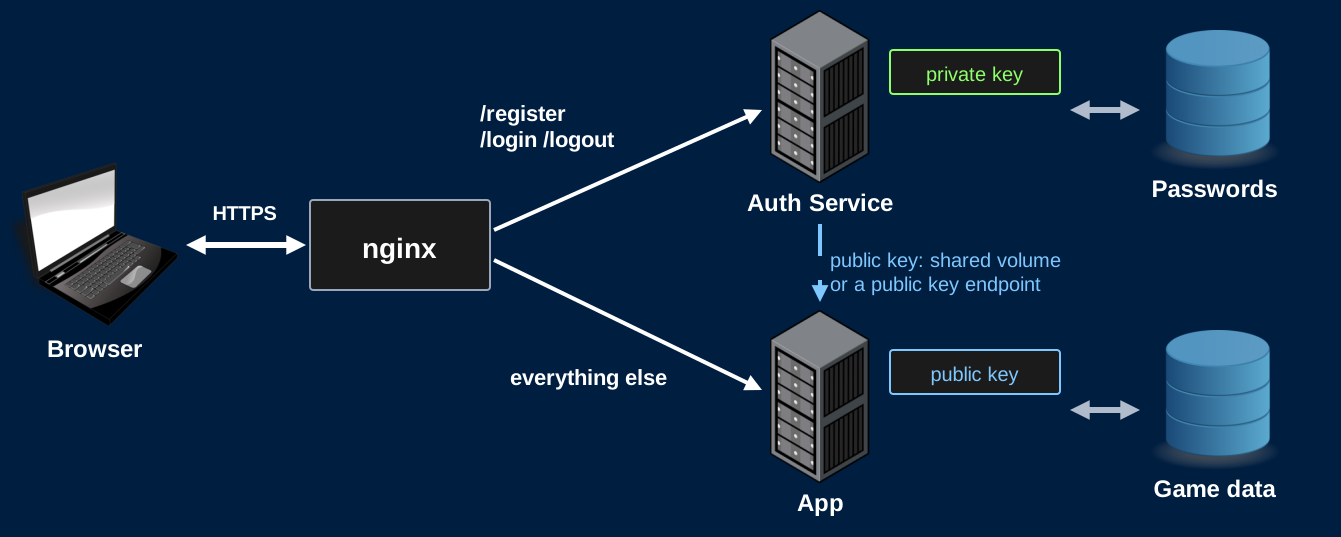
- A separate service, in its own container, handles registration, login, and logout
- It has the private key and the password database
- It issues a signed JWT in a cookie on login
- Nginx routes
/register,/login, and/logoutto the auth service, and everything else to your app - Your app verifies JWTs with the public key
- No request to the auth service and no database lookup
The Auth Service
Keys
- Generate the key pair when the auth service starts, if it doesn't have one yet
- Store the private key in a volume that only the auth service mounts
- Keys must survive a restart, or every JWT stops working
- Never commit a private key
- Not even your app server should hold the private key
- Share the public key with your app
- A volume both containers mount, or an endpoint on the auth service that returns it